Mobile Driver App

Laundry Driver App

Give your delivery drivers their own app for trips, pickups, deliveries, returns and bills, all on their phone and linked to your laundry system.

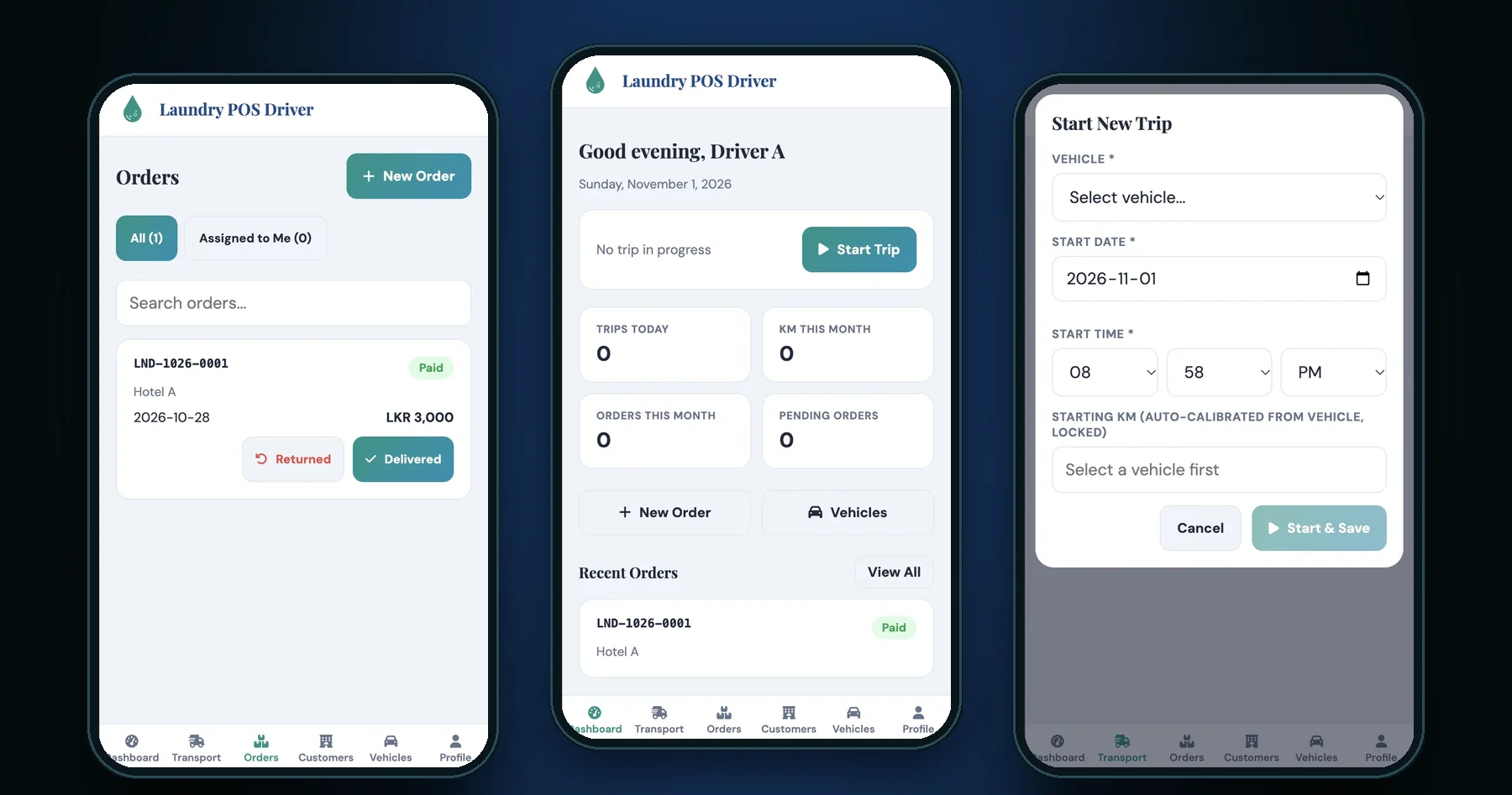
Laundry Driver App screens
Key features

Everything your drivers need, on their phone.

Driver login and privacy

  • Each driver signs in with their own username and password, set up by an admin in the main system
  • Only driver accounts can sign in to the app; office staff accounts are turned away
  • The driver's name is filled in automatically wherever a driver is needed, so there is nothing to choose
  • Drivers can't see or change other drivers' profiles, trips or data
  • Login screen uses your laundry's logo and brand colour
Trips

  • Start a trip in a few taps: choose the vehicle, and the date and time are filled in for you
  • Starting km is filled in and locked, taken from the vehicle's last trip (whoever drove it) or its registered starting reading, so it can't be typed wrong
  • A vehicle in use can't be picked by another driver until the trip ends
  • A driver can only have one trip running at a time
  • Availability is checked again at the moment of saving, so two drivers can't take the same vehicle at once
  • End the trip with the final km; the app won't accept a final km lower than the start
  • Distance travelled is worked out and shown before saving
  • Record the customers visited, in the order visited, plus any notes
  • My Trips list shows the trip in progress and every past trip

Taking orders on the road

  • Take a new order at the customer's door, with no need to call the office
  • Search and pick the customer, or add a new customer on the spot
  • Add as many items as needed, each with its own service: Dry Clean, Wash & Press or Wash & Dry
  • Prices fill in automatically from your price list
  • Custom prices for each customer are used automatically when you pick that customer
  • Change the price on any line when needed
  • Add delivery charges, extra payments and an advance payment
  • A discount can be given once the order reaches the minimum amount set in the main system
  • The grand total updates as you type
  • Every order gets its own batch number automatically
  • Orders are marked Paid, Partially Paid or Unpaid from the advance taken. A fully paid order gets its invoice straight away

Deliveries and returns

  • See all orders, or just the ones assigned to you
  • Search orders by batch number or customer name
  • Mark an order Delivered in one tap. An unassigned order is assigned to you as you deliver it
  • Select several orders and mark them all delivered at once
  • Orders assigned to another driver are shown as view only
  • Returned items: record how many of each item the customer handed back (wrong item, damaged, refused), and the office sees it on the order

Bills

  • Open any order to see the full bill on screen
  • The bill shows your logo, company details, items, services, discount, delivery charge, payments made and balance due
  • Paid and credit bills are clearly marked
  • Download the bill as a PDF straight to the phone, named after the order's batch number, ready to send to the customer

Customers

  • Search customers by name, phone number or contact person
  • Add a new customer with contact person, phone, email and address
  • Each customer's orders are split into All, Paid and Unpaid
  • Totals for all bills, amount paid and amount still unpaid

Vehicles

  • List of all vehicles, with number, model, type and status
  • See which vehicles are free and which are on a trip
  • Trip history and a distance chart for each vehicle
  • Total distance travelled across the fleet

Driver profile

  • The driver's name, nickname, phone numbers, NIC, email, address and status
  • Total trips (completed and in progress) and total km driven
  • Full trip history and a distance chart

Works with your main laundry system

  • Uses the same database as your main laundry system, so there is nothing to copy across
  • New orders, deliveries, returns and trips appear in the office straight away
  • Every driver action is saved to the main system's activity log: who did what, and when
  • Your company name, logo and colours come from the main system's settings, so changing them there updates the driver app too

Built for the phone

  • Made for mobile screens first, and works on tablets too
  • Every screen and pop-up works in portrait and landscape
  • Large buttons and a bottom menu bar that are easy to use with one hand
  • Number boxes clear themselves when tapped, so amounts are quick to enter
  • Runs in the phone's web browser, so there is nothing to install from an app store

Suitable for

  • Laundries and dry cleaners with their own pickup and delivery drivers
  • Laundries serving hotels, guest houses, restaurants and other business customers
  • Businesses that want to track vehicle use and km for each driver
  • Laundries already using our main laundry management system

Included modules

  • Driver login
  • Dashboard
  • Transport (start and end trips)
  • Orders (deliver, return, view bills)
  • New order
  • Customers
  • Vehicles
  • Driver profile

The exact feature list is confirmed in the demo.

Customisation

Made to fit your business.

The app can be adapted to how your laundry works:

  • your service types and price lists
  • your bill layout and branding
  • the details drivers record on each trip
  • the screens your drivers need

We plan each change with you before we start.

Questions

Can I see it working before I decide?

Yes. We give you a live demo of the real app using sample data.

Do my drivers need to install anything?

No. The app runs in the phone's web browser. Drivers just open the link and sign in.

Does it work with my main laundry system?

Yes. The driver app uses the same database as the main system, so orders, deliveries and trips show up in the office straight away.

Can a driver see other drivers' work?

No. Each driver only sees their own profile and trips. Orders assigned to another driver are view only.

Can two drivers take the same vehicle?

No. Once a driver starts a trip with a vehicle, it is locked until that trip ends.

Can drivers change the km reading?

The starting km is filled in from the vehicle's last trip and can't be edited. The final km must be higher than the starting km, so distance records stay accurate.

Can drivers give customers a bill?

Yes. Drivers can open any order's bill and download it as a PDF to send to the customer.

How much does it cost?

Pricing depends on your requirements. Contact us for a quote.

Enquire

Interested in Laundry Driver App?

Send us a message. Pricing is shared once we understand your needs. We aim to respond within one business day.

We do not list prices online. Tell us what you need and we will send a quote. We aim to respond within one business day.

Related templates

You may also like.

Laundry ERP dashboard

Laundry ERP

POS & ERP System

A complete laundry management system for commercial laundries and dry cleaners. It covers orders, billing, payments, transport and expenses, with clear reports.

  • Orders & Billing
  • Transport & Drivers
  • Reports & Analytics
Ice Factory ERP dashboard

Ice Factory ERP

POS & ERP System

A complete business management system for ice factories and ice distributors. It covers sales, stock, credit customers, cash and bank, transport and staff, with clear reports.

  • Sales & Stock
  • Debts & Cash Flow
  • Reports & Analytics